
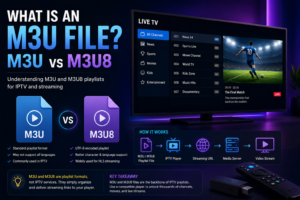
If you have ever used IPTV, media players, or streaming playlists, you may have come across an M3U file or an M3U8 file. These files are commonly used to organize streaming URLs and tell compatible media players where to find video or audio content.
But what exactly is an M3U file, and how is it different from M3U8?
An M3U file is essentially a playlist file containing information about media streams. Instead of storing the actual video inside the file, it stores links and metadata that a compatible player can use to access the streams.
In this guide, we will explain what an M3U file is, how it works, the difference between M3U and M3U8, and how these formats are commonly used with IPTV.
If you are completely new to IPTV playlists, you can also start with our M3U IPTV Playlist Complete Guide for a broader explanation of how M3U playlists work.
An M3U file is a text-based playlist file used to organize media files or streaming URLs.
The file does not normally contain the actual video or audio content. Instead, it contains information that tells a compatible media player where the content can be found.
For example, an M3U playlist may contain:
Because M3U files are simple text files, they can be opened and viewed with a basic text editor.
An IPTV player can read this information and turn the playlist into an organized channel list.
A basic M3U playlist can look something like this:
#EXTM3U
#EXTINF:-1,Example Channel
https://example.com/stream.m3u8
The first line identifies the playlist format.
The #EXTINF line provides information about the media stream, while the following line contains the streaming location.
This is only a technical example. Real IPTV playlists can contain hundreds or thousands of entries and much more metadata.
The process is relatively simple.
When you load an M3U playlist into a compatible IPTV player, the player reads the information contained in the file.
The player then uses the streaming URLs listed in the playlist to request the corresponding media streams.
The basic process looks like this:
M3U File → IPTV Player → Streaming URL → Media Server → Video Stream
The M3U file acts as an organized list of instructions rather than the actual streaming content.
This is why an M3U file can be very small even when it contains hundreds or thousands of channels.
In IPTV, an M3U playlist can be used to organize live television channels, radio stations, video streams, and other media.
A provider may give you an M3U URL instead of asking you to download a physical file.
In that situation, your IPTV player retrieves the playlist from the URL and loads the available channels.
For a complete step-by-step explanation, see our guide on How to Use an M3U Playlist for IPTV.
M3U is commonly associated with a playlist format originally used for organizing multimedia files.
The important thing for IPTV users is that M3U is a playlist format, not an IPTV service.
This distinction is important.
An M3U file does not automatically provide television channels or streaming content. The file simply contains information about where media streams can be accessed.
The actual content depends on the sources included in the playlist.
An M3U8 file is a UTF-8 version of the M3U playlist format.
The main difference is how text encoding is handled.
M3U8 uses UTF-8 encoding, which allows playlist information to properly represent a much wider range of characters and languages.
This makes M3U8 particularly useful for modern internet streaming environments where playlists may contain:
M3U8 files are also widely associated with HTTP Live Streaming (HLS).
The two formats are closely related, but there are some important differences.
| Feature | M3U | M3U8 |
|---|---|---|
| Playlist format | Yes | Yes |
| Text-based | Yes | Yes |
| UTF-8 encoding | Not necessarily | Yes |
| IPTV usage | Common | Common |
| HLS usage | Possible | Very common |
| International characters | Limited depending on encoding | Better support |
| Modern streaming | Supported | Widely used |
The biggest technical distinction is character encoding.
M3U8 specifically uses UTF-8, making it more reliable when playlist information contains characters from different languages.
Not necessarily.
M3U8 is not simply a “better quality” version of M3U.
The difference is mainly related to encoding and how the playlist is used.
For modern internet streaming, M3U8 is particularly common because it works well with UTF-8 text and HLS-based streaming.
However, both M3U and M3U8 can be useful depending on the application and the media player.
What matters most is whether your IPTV player supports the format and whether the streaming source is working correctly.
For IPTV users, both formats can be encountered.
An IPTV provider may give you an M3U playlist URL containing channel information. Individual streaming URLs inside the playlist may also point to formats such as M3U8.
This can sometimes be confusing because the playlist format and the stream format are not necessarily the same thing.
For example:
M3U Playlist
      ↓
Channel Information
      ↓
M3U8 Streaming URL
      ↓
HLS Stream
An M3U playlist can therefore contain URLs pointing to M3U8 streams.
An M3U playlist can contain much more than a simple list of URLs.
Depending on how the playlist was created, it may include metadata such as:
This is the name displayed by the IPTV player.
This tells the player where to request the media stream.
Channels can be organized into categories such as:
Some playlists include an image URL that allows the IPTV player to display a channel logo.
Some playlists contain information that can help an IPTV player associate channels with Electronic Program Guide data.
Other attributes may be included depending on the IPTV provider and player being used.
Yes.
Because M3U files are text-based, you can usually open them using a standard text editor.
On a computer, you can use applications such as:
Opening the file allows you to inspect the playlist contents.
However, manually editing a large IPTV playlist is usually inconvenient because playlists can contain hundreds or thousands of entries.
Creating a basic M3U file is relatively simple.
Start with the M3U header:
#EXTM3UThen add an entry containing the media information and URL:
#EXTINF:-1,Example Channel
https://example.com/stream.m3u8
Save the file with the .m3u extension.
A compatible media player can then read the playlist.
For more advanced IPTV playlists, additional metadata can be added to each entry.
Once you have a valid M3U playlist, you need a compatible media player.
The exact process depends on your device and application.
Generally, the process involves:
Different IPTV players use slightly different menus.
If you need detailed instructions, read our How to Use an M3U Playlist for IPTV guide.
Many media players can work with M3U playlists.
Popular options include:
VLC supports playlist files and network streams, making it useful for testing whether an M3U playlist or individual stream URL works correctly.
Dedicated IPTV applications can provide additional features such as:
The exact features depend on the application.
Depending on the operating system, you may also find IPTV applications that support M3U playlists on:
Always check whether your chosen player supports the playlist format before attempting to import it.
An M3U file can fail for several reasons.
The problem is not necessarily the file format itself.
The playlist may contain URLs that are no longer available.
Some M3U URLs are temporary and may expire after a certain period.
If the streaming server is offline or overloaded, the channels may stop working.
A small mistake when copying the URL can prevent the player from loading the playlist.
Some applications may not support certain playlist features or stream formats.
A weak or unstable connection can cause buffering or playback failures even when the playlist itself is valid.
If your M3U playlist suddenly stops working, checking the playlist URL and testing the connection are good first steps.
These terms are closely related but not identical.
An M3U file is a playlist stored as a file on your device.
An M3U playlist URL points to a playlist hosted somewhere online.
For example:
M3U File
↓
Stored locally on your device

M3U URL
↓
Playlist hosted on a remote server
An IPTV player can often use either method, depending on what the application supports.
A URL can be more convenient because you do not need to manually download and update a local file.
The M3U format itself is simply a playlist format.
Using an M3U file does not automatically determine whether the content being accessed is legal.
The important factor is the source of the streams contained in the playlist.
Users should make sure that they have permission to access and stream the content and should follow the copyright laws applicable in their country.
Avoid downloading suspicious files or entering account credentials into unknown websites or applications.
The easiest way to understand the relationship is:
M3U = Playlist
M3U8 = UTF-8 playlist format commonly used with modern streaming
M3U URL = Online location of a playlist
IPTV Player = Application that reads the playlist and plays compatible streams
An M3U file does not contain the television service itself. It simply organizes information that a compatible player can use to access media streams.
An M3U file is used to organize media files or streaming URLs into a playlist that compatible media players can read.
M3U8 is an M3U playlist format that specifically uses UTF-8 text encoding. M3U8 is also commonly used with HTTP Live Streaming and modern internet video.
Yes. Many IPTV players support M3U playlists. The playlist can contain information about IPTV channels and their corresponding streaming URLs.
No. M3U8 is a playlist/streaming-related format. IPTV is a method of delivering television content over IP networks.
Yes. VLC Media Player supports playlist files and network streams, making it useful for testing compatible M3U playlists.
Yes. Because M3U files are text-based, they can usually be opened and edited with a text editor. However, large playlists can be difficult to manage manually.
The playlist may be empty, expired, incorrectly formatted, or the streaming URLs may no longer work. The IPTV player itself may also have compatibility issues.
Usually, no. An M3U file is generally a text-based playlist containing references to media files or streaming URLs rather than the actual video content.
An M3U file is a simple but powerful way to organize media streams and playlist information.
For IPTV users, understanding the difference between an M3U file, an M3U URL, and an M3U8 stream can make playlist setup and troubleshooting much easier.
M3U and M3U8 are closely related, but M3U8 specifically uses UTF-8 encoding and is widely associated with modern internet streaming technologies such as HLS.
If you want to understand the bigger picture, continue with our M3U IPTV Playlist Complete Guide, where we explain how M3U playlists work, how to use them, compatible devices, common problems, and more.